Insights From Our Software Advisors: Stand Out in Legal Management

November 10, 2025
Contributor: Shephalii Kapoor

Search behavior is reshaping how buyers find and evaluate software, forcing providers to rethink their marketing strategies.

Intensifying competition has led legal teams to adopt technology to stay ahead. Legal management software centralizes documents, automates tasks, and supports compliance, making it an essential asset for modern legal operations. Gartner forecasts that by 2026, 40% of legal departments will use workflow tools to streamline intake and triage for in-house work.[1]

To simplify processes, many organizations are actively searching for the right legal management tools on Gartner Digital Markets’ buyer destination sites—Capterra, GetApp, and Software Advice. Yet with so many options in the market, buyers often need help identifying which product truly fits their needs.

Our software advisors speak with thousands of buyers every year, qualifying them based on budget, authority, need, and timeline (BANT). We’ve analyzed these real buyer conversations to help vendors sharpen their messaging and position their legal management software to match what buyers are actually looking for.

Key insights:

  • Most businesses use either non-specialized tools or manual methods to manage their day-to-day legal practices. While some buyers already have a dedicated system, buyers do not have any system in place yet.
  • Switching to business legal management software is driven by the need for efficiency, functional sufficiency, and new business opportunities.
  • Software buyers prioritize case management functionality during purchase. Those already using the software consider document management a top priority in legal management tools.
  • The top five segments investing in legal management software allocate between $86 to $100 per user, per month with an overall buyer average of $94 per user, per month. 

Tools buyers are replacing with legal management software

When our advisors asked buyers what methods they were currently using to handle their day-to-day legal operations, here's what they found:

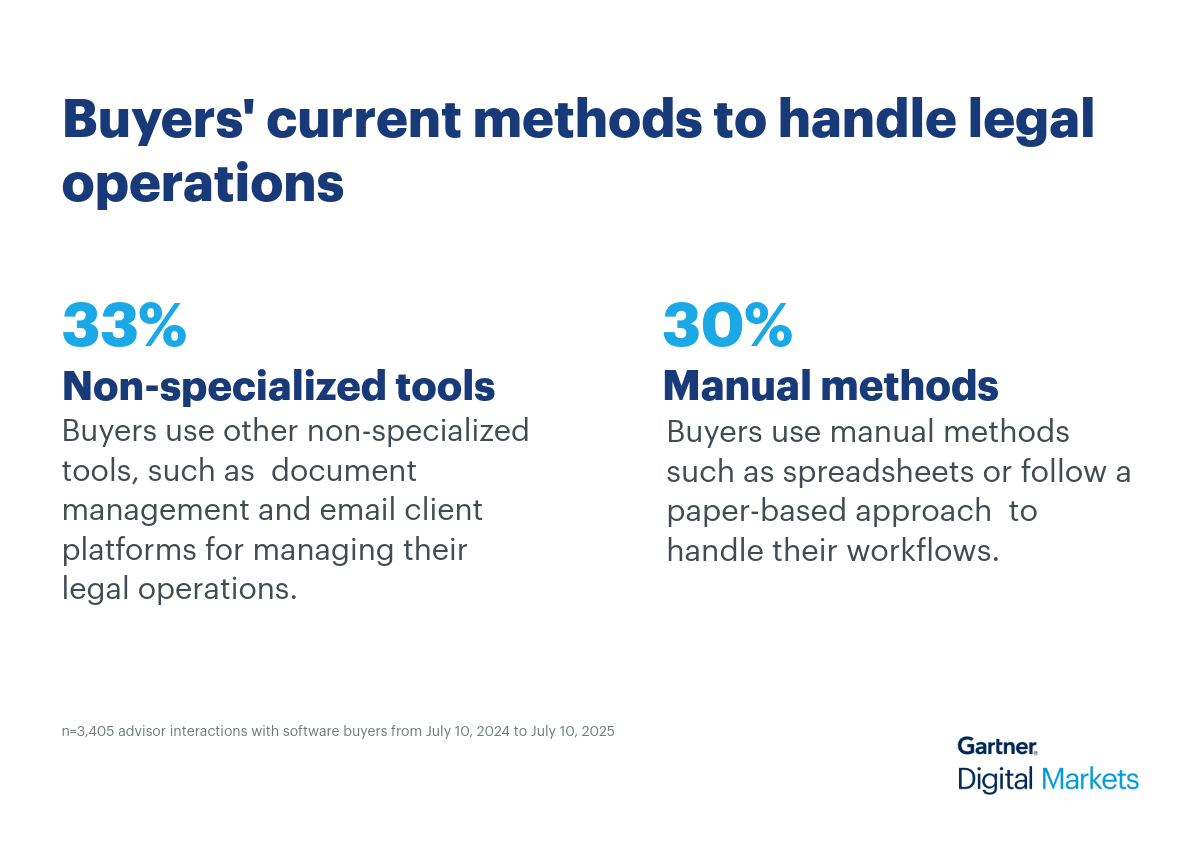
  • Around 33% of buyers use non-specialized tools, such as document management and email client software to manage their operation workflows.
  • Nearly 30% of buyers rely on manual methods such as spreadsheets or have a paper-based approach, whereas 16% do not have any system in place.

While manual methods of managing legal cases and documents may be sufficient for small legal teams, they often result in inefficiencies and errors as the firm grows and legal operations become more complex. Similarly, relying on generic non-specialized tools to manage legal operations can lead to misaligned processes. This is because these solutions often lack specialized features for tracking case progress, managing legal documents, or ensuring specific legal compliances.

Unlike scattered spreadsheets or general non-specialized software, a dedicated legal management system provides integrated solutions for case management, document automation, billing, and communication. This simplifies legal workflows by reducing errors and administrative burden.

Pro tip: Pinpoint pain points of legal professionals, then show how your legal software's features will drive better business outcomes for them. Be sure to highlight the tool’s industry-specific functionalities, available customization opportunities, and integration options to help you manage legal operations.

Why buyers switch to legal management software

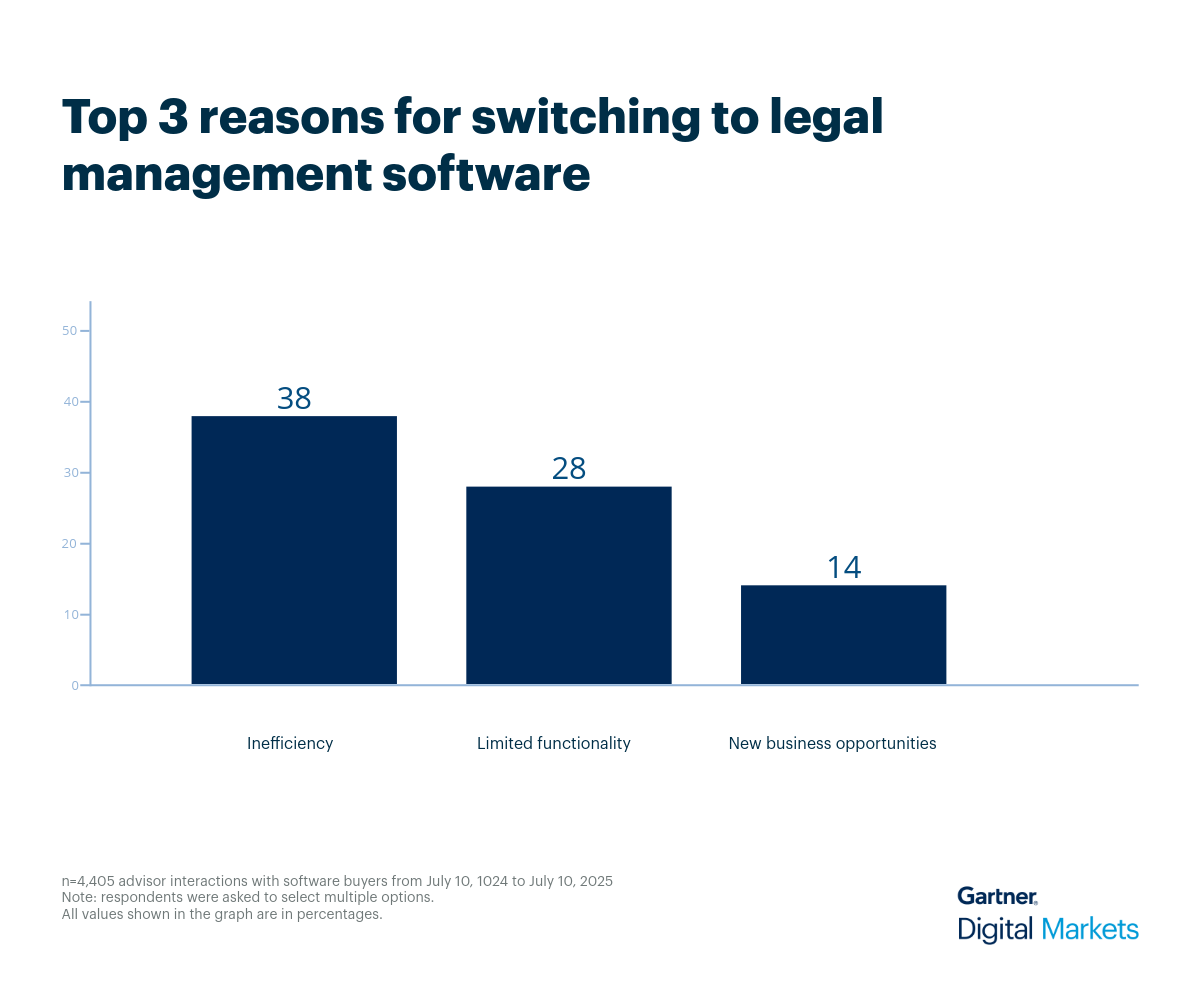
Our advisors conversed with buyers currently using either manual methods or non-specialized software and seeking a switch to legal management software. These discussions shed light on businesses’ real-life challenges with their existing tools, including inefficiency (38%), limited functionality (28%), and new business opportunities (14%).

  • Inefficiency: Manual data entry and document handling often result in errors and inaccuracies, causing delays in legal processes. Generic non-specialized tools, which are not tailored for legal workflows, can also increase inefficiencies as they lack features such as automated deadline tracking or case-specific templates, which can make routine tasks time-consuming and error-prone.
  • Limited functionality: Retrieving specific legal documents from physical files is time-consuming, and generic non-specialized tools offer only basic document storage without advanced search, tagging, or version control capabilities. Legal management software, on the other hand, simplifies document search, retrieval, and version control, ensuring that legal teams can quickly access the information they need.
  • New business opportunities: Manual methods and generic non-specialized tools prove inefficient for complex legal operations. They lack legal-specific workflows, advanced analytics, and automation for key tasks such as client intake and conflict checking—leading to disorganized data, missed follow-ups, and wasted time on administrative work. This hinders firms from efficiently attracting, engaging, and converting new clients.

Our interactions with buyers shows that many vendors struggle to show how their software improves legal managers’ day-to-day workflows. Compared to manual methods and non-specialized tools, dedicated legal management systems offer clear, purpose-built advantages, as listed below:

  • Better data insights: Dedicated legal software centralizes all firm data, offering real-time analytics on operations, finances, and caseloads. This provides data-driven insights for strategic planning, identifying bottlenecks, and optimizing resource allocation.
  • Improved operational efficiency: The system automates repetitive administrative tasks such as document generation, calendaring, and task assignments. This reduces manual workload and errors, freeing up legal professionals to focus on high-value legal work, boosting overall productivity.
  • Stronger compliance and risk management: Designed with legal regulations in mind, a dedicated legal management solution includes features such as automated conflict checking, secure document versioning, and audit trails. This mitigates risks from data breaches, ethical violations, and non-compliance, protecting the firm's reputation.

Pro tip: Equip your sales team to collect detailed prospect requirements and deliver tailored product demos. Reinforce these presentations with customer success stories and testimonials to build trust and close more deals.

What legal management software features are valued the most

When evaluating legal management software, our advisor conversations and review analysis reveal a gap between what buyers seek and what users value most.

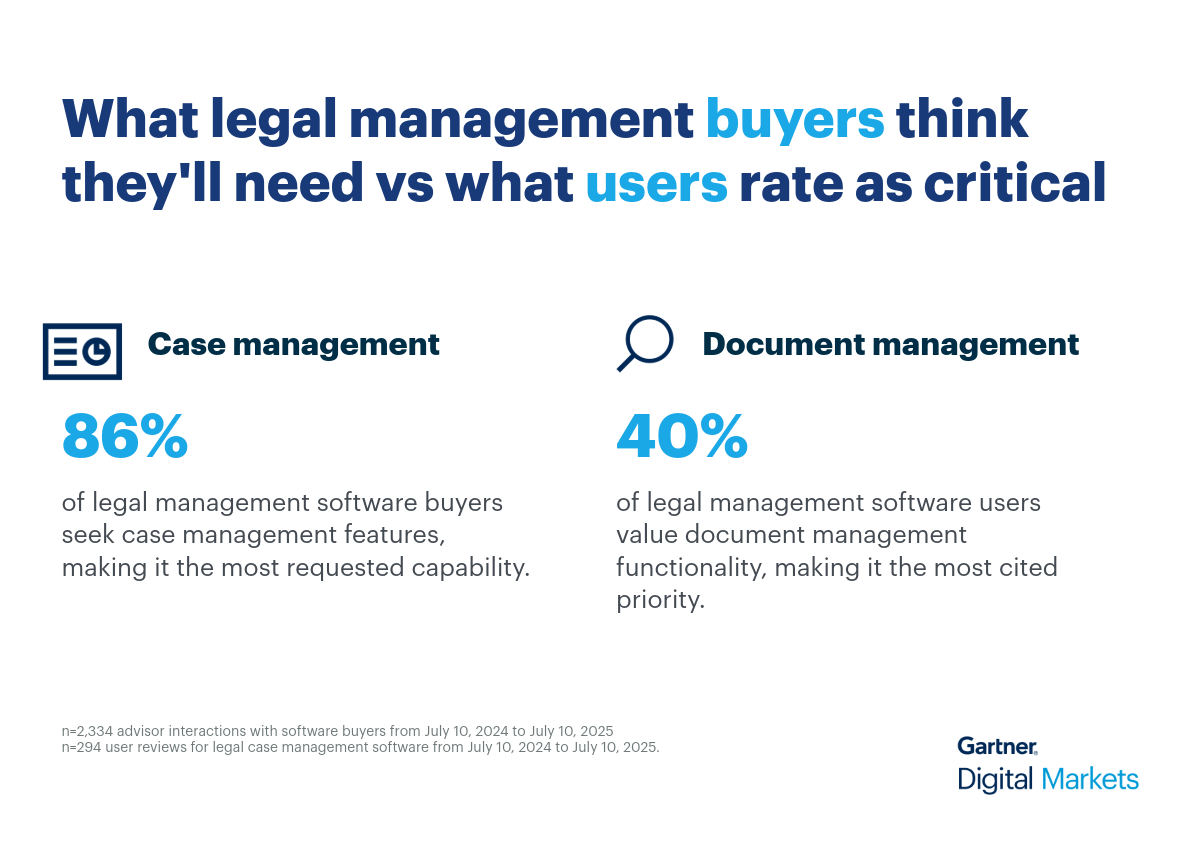
  • Buyers prioritize case management (86%), followed by document management (69%), contact management (61%), billing and invoicing (51%), and time tracking (47%).
  • Current users rank case management lower, despite its prominence in buyer priorities. Instead, 40% users rate document management as the most critical feature in legal management tools.

This discrepancy highlights a key insight: while buyers focus on organizing legal workflows during purchase, users rely more on tools that support daily operational efficiency and collaboration.

  • Case management helps legal teams centralize client intake, documents, deadlines, and communications in one place, improving visibility and coordination across cases.
  • Document management enables secure storage and retrieval of legal files, while billing and time tracking support accurate invoicing and compliance.

Pro tip: Identify what buyers value most and update your product profile to highlight key strengths and real-world use cases. Showcase awards and badges to demonstrate how your software stands out from the competition. 

Use cases for legal management software

Beyond traditional law firms, legal case management software serves a diverse range of segments, each with unique operational demands and specific feature requirements to effectively manage their legal matters. For example:

  • Litigation firms use legal management software to track the entire lifecycle of a lawsuit, from initial client intake and complaint filing to discovery, trial, and appeals. Therefore, their feature requirements may include document management, court calendaring and deadline management.
  • Immigration agencies use legal management software to centralize client data, automate form submissions, and track application progress. Their key feature requirements may include secure client portals, automated deadline reminders, and reporting tools for caseload and compliance monitoring.
  • Estate planning firms utilize legal management software to draft and manage wills, trusts, and other important estate documents while navigating complex family dynamics and tax laws. Essential features for them include document automation with clause libraries for various estate instruments and secure client portals for sensitive personal and financial data.
  • Personal injury law firms use legal software to manage numerous accident and insurance cases, often on a contingency basis. Their primary feature requirements include medical record management, lien tracking, settlement calculators, and automated document generation.
  • Family law practices use legal management software to organize sensitive cases such as divorce and child custody. They need features such as customizable intake forms, property division calculators, and online client portals for secure document sharing.
     

Average budgets for legal management software across industries 

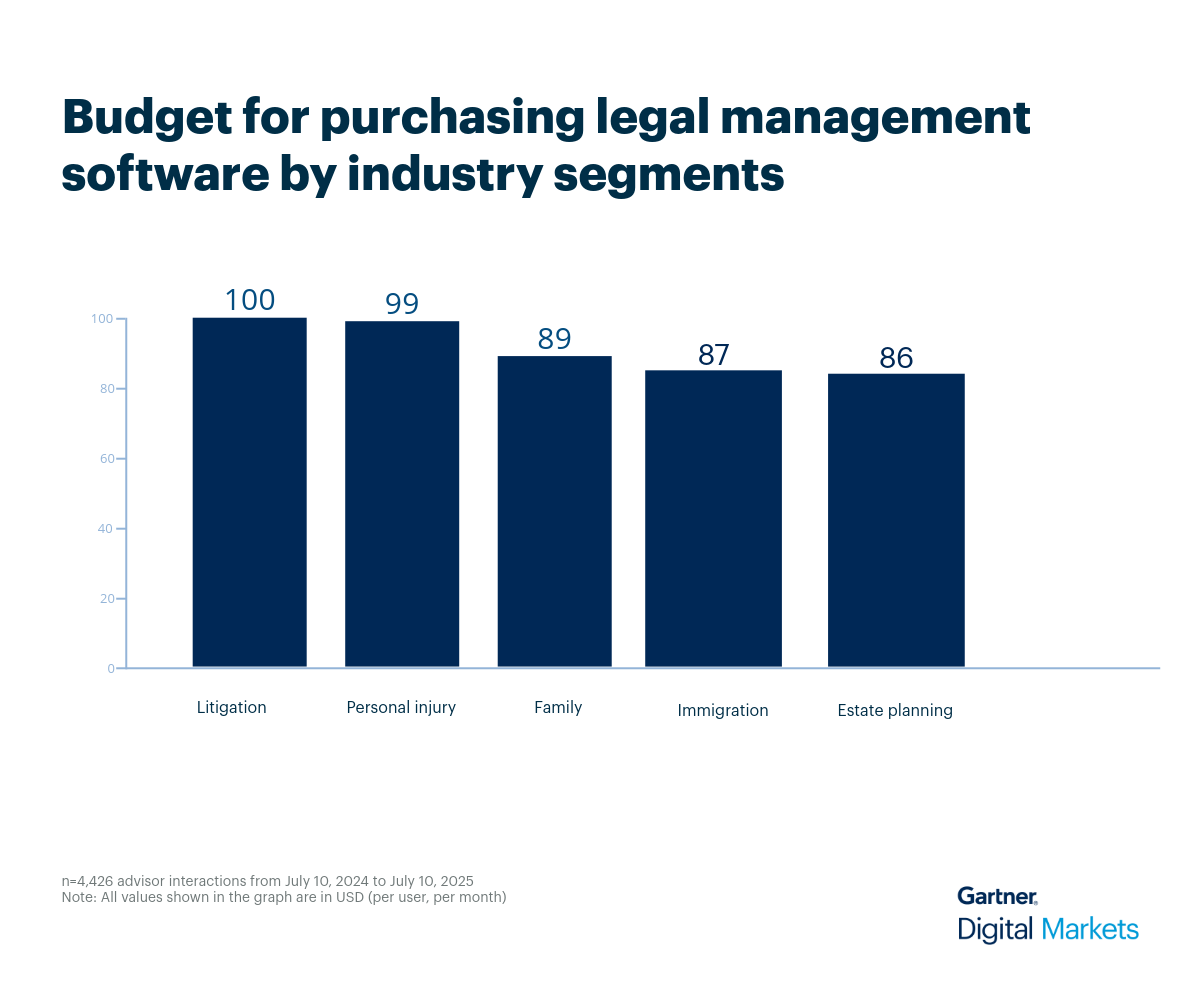
Organizations across the top five segments within the broader field of law are willing to allocate an average budget of between $86 to $100 per user, per month. Additionally, the overall average budget for purchasing legal software is approximately $94 per user, per month.

However, the budget for purchasing legal management software varies from one segment to another based on factors such as the number of users, firm size, specific functionalities required, and integration needs.

Here’s how different legal industry segments budget (in dollars, per user, per month) for purchasing legal management software.

Pro tip: When determining the pricing of your software, consider the specific industry needs of your target buyers as some sectors may have more complex requirements that can affect costs. Use the Capterra 2025 Shortlist for legal case management software to compare your offering to competitors.

Buyer goals and challenges—what advisors are hearing

Buyers in the legal management space often come with specific expectations and recurring questions that reflect their unique operational needs. Through direct conversations with our software advisors, we’ve gathered insights into buyer behavior and their tasks, revealing patterns in their priorities, challenges, and decision-making criteria.

  • What common misconceptions do buyers have about legal management software?
    Many buyers mistakenly believe legal software is not cloud-based or lacks offline access. Others assume it can't support client access or specific state-level templates, leading to confusion about capabilities such as docketing or document drafting.
  • What problems are buyers typically trying to solve that this type of software addresses?
    Buyers often seek to improve efficiency by consolidating case management, document handling, time tracking, and billing. They’re frustrated by outdated systems with poor searchability, fragmented workflows, and lack of integration with tools, such as OneDrive or Clio Draft.
  • How important are integrations for this type of software?
    Integrations are critical. Buyers frequently ask about compatibility with email platforms (e.g., Gmail, Outlook), accounting tools (e.g., QuickBooks), and CRM systems. Lack of seamless integration can be a dealbreaker, especially for firms managing large caseloads or billing operations.
  • Anything unique that buyers in this category specifically ask for?
    Legal buyers often request trust accounting, personal injury-specific templates, and court docketing features. They also prioritize calendaring aligned with state-specific legal timelines and increasingly inquire about AI capabilities for automation and document handling.
     

Recommended actions for legal management software vendors

Here are five strategic actions vendors can take to better meet buyer expectations and stand out in a competitive market:

  1. Focus messaging on legal-specific workflow automation.
    Directly address the inefficiencies of manual methods and generic tools. Highlight how your software automates legal workflows, such as case intake, document generation, and deadline tracking to reduce errors and improve operational efficiency.
  2. Customize demos to showcase document management strengths.
    Bridge the gap between buyer priorities (case management) and user realities (document management). Start demos with document handling features such as version control and secure search, then connect them to broader case workflows.
  3. Emphasize compliance and risk mitigation.
    Reassure buyers by showcasing features such as conflict checking, audit trails, and secure document storage. Position your software as a tool that helps legal teams stay compliant with regulations and avoid reputational risks.
  4. Enhance your product profile for legal credibility.
    Update your Gartner Digital Markets profile to highlight legal-specific features such as docketing, trust accounting, and personal injury templates. Add social proof such as awards, certifications, and client testimonials to build trust.
  5. Be transparent and integration-ready.
    Clearly display your pricing, aligning with the average budget of $100/user/month. Detail integrations with email platforms, accounting tools, and CRMs, especially those commonly used in legal practices to show how your software fits into existing firm workflows.
     

Rise above your competition with strategic insights

Legal software marketers face mounting pressure to stand out in a crowded market. With the right insights, you can pinpoint buyer priorities and pain points and craft messaging that earns attention and drives action.

With more than 10 million active software buyers on our sites every month, Gartner Digital Markets can equip you with the strategic insights you need to level up your marketing strategy and become a leader in your category.

Log into your Gartner Digital Markets account and optimize your profile to ensure buyers understand how your software meets their evolving needs.

Once your profile is ready, use this insight to build a high-quality sales pipeline and this resource to master follow-ups that convert leads into customers.

Sources

  1. Market Guide for Corporate Legal Operations Technology, Gartner
     

Methodology and buyer demographics

Findings are based on data from conversations that Gartner Digital Markets’ advisor team has daily with software buyers seeking guidance on purchase decisions. The data used to create this report is based on interactions with small-to-midsize businesses seeking legal management tools. For this report, we analyzed approximately 2,300+ phone interactions from July 10, 2024, to July 10, 2025.

The findings of this report represent buyers who contacted Gartner Digital Markets and may not be indicative of the market as a whole. Data points are rounded to the nearest whole number.

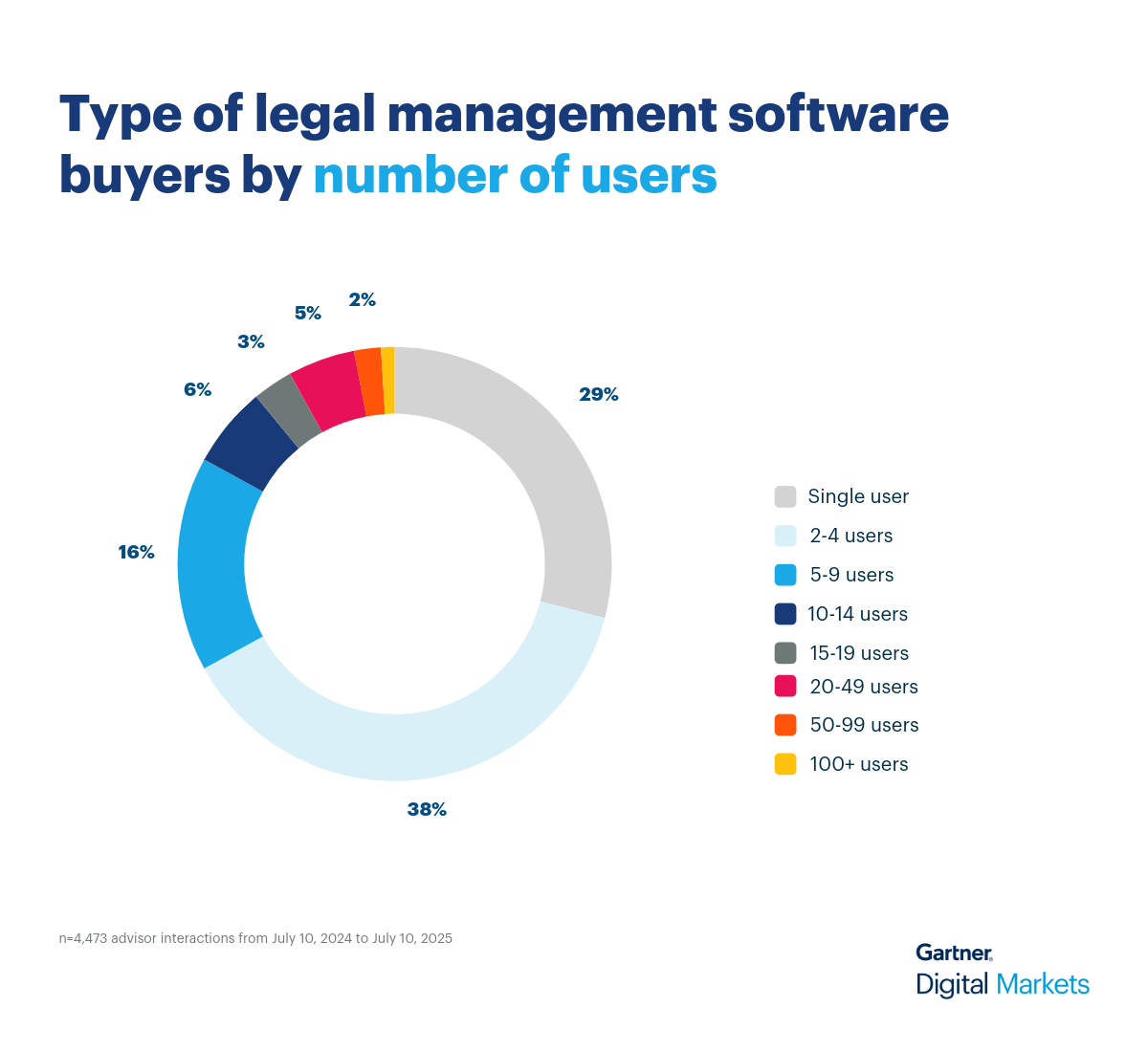
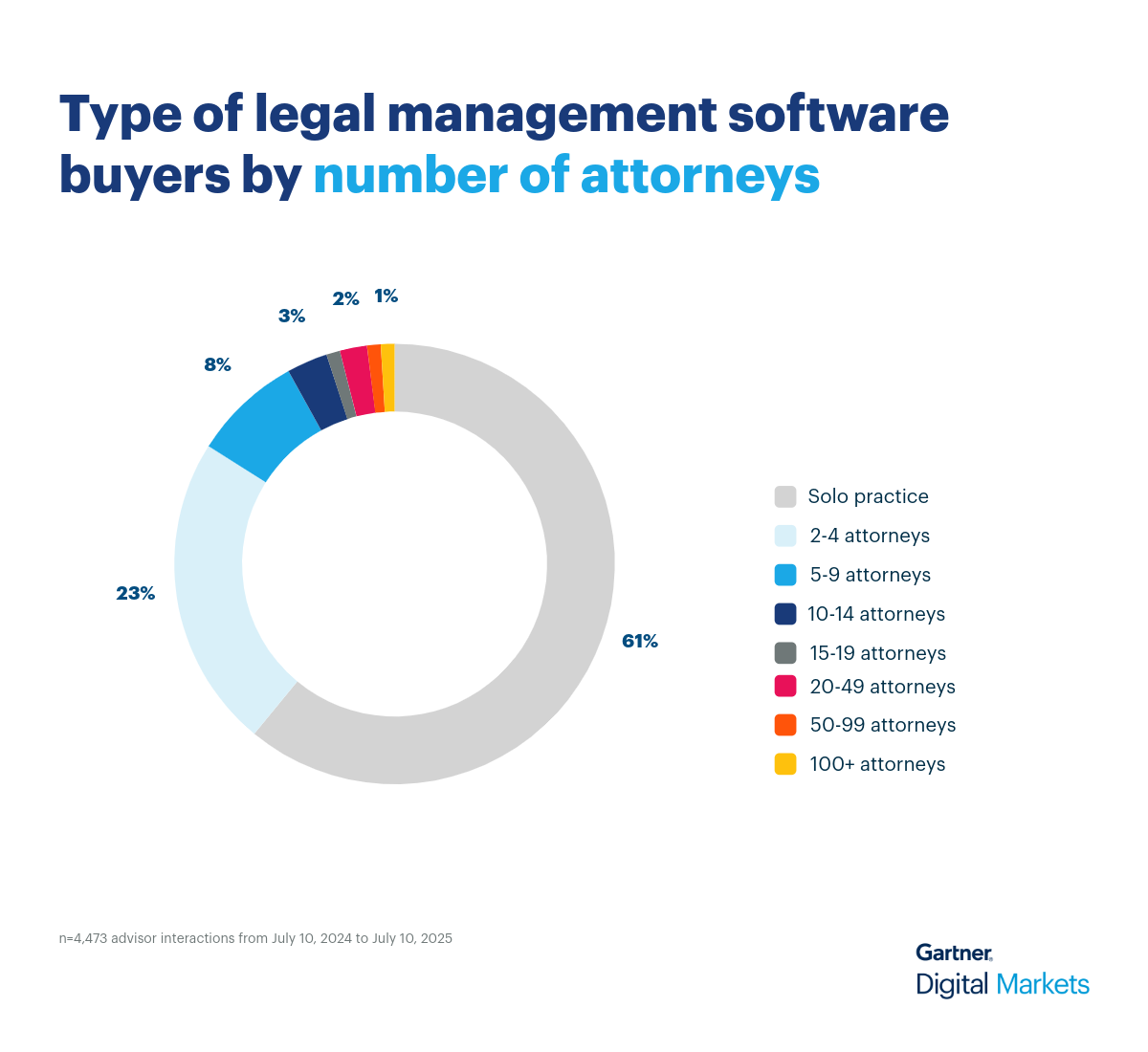
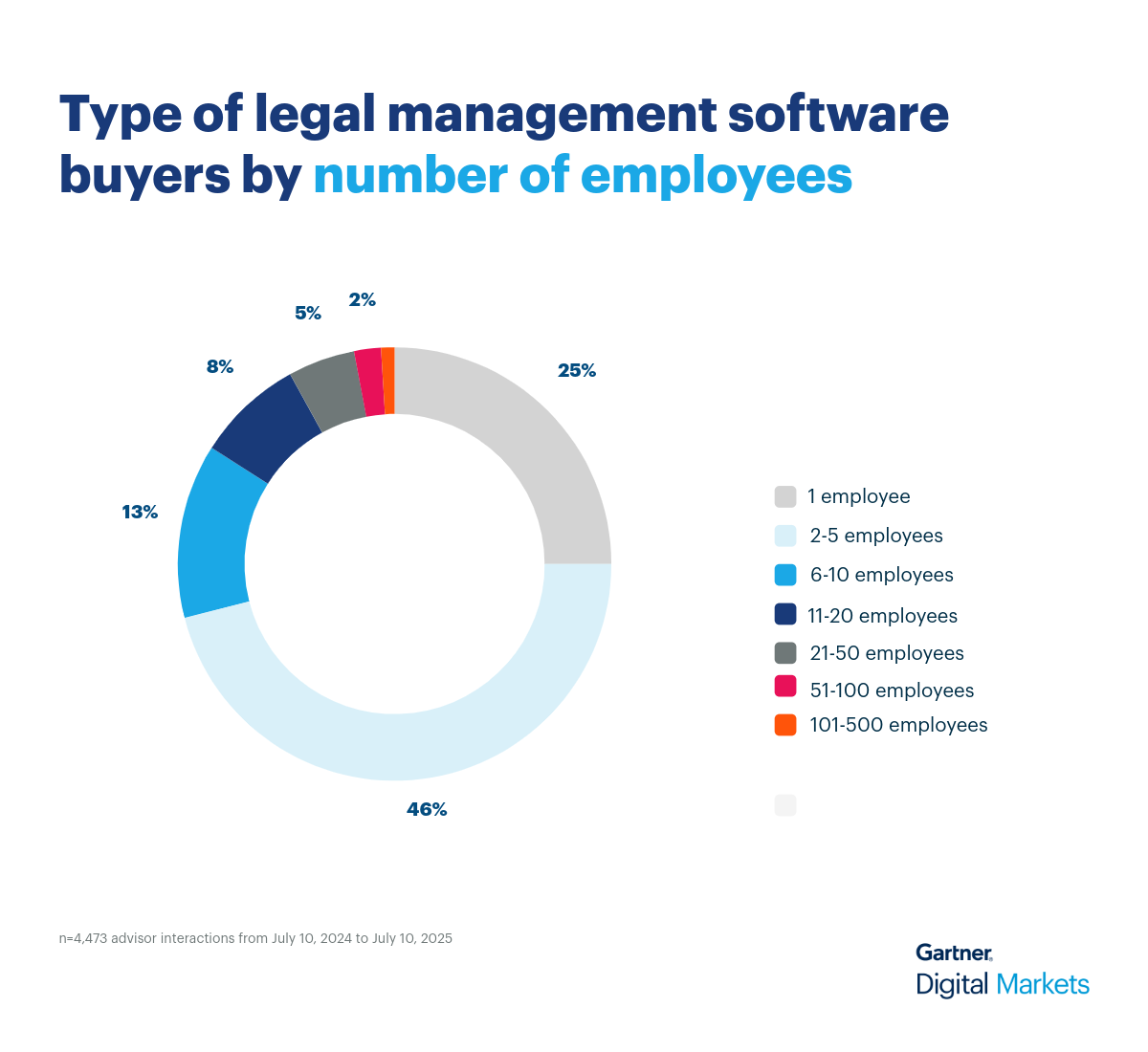
The buyers we interacted with are largely small businesses representing a growing majority of legal management software purchases. Below you’ll find the demographics of the buyers so you can see the size and type of businesses, from annual revenue to industry.


Shephalii Kapoor

Shephalii Kapoor

Shephalii Kapoor is a writer at Gartner Digital Markets. She provides insights to help small businesses identify the right software for their needs by analyzing over 550,000 Gartner Digital Markets user reviews and nearly 48,000 interactions between Gartner Digital Markets software advisors and buyers.

Get the Gartner Digital Markets Newsletter

We value your privacy. By submitting this form, you agree we may use your information in accordance with the terms of the Gartner Digital Markets Privacy Policy.

Connect. Convert. Thrive.

Connect to millions of in-market software buyers around the globe with our all-encompassing suite of marketing services.