Insights From our Software Advisors: Stand out in CRM

January 13, 2026
Contributor: Shephalii Kapoor

Customer expectations are evolving faster than ever, and SMBs face mounting pressure to deliver personalized experiences while managing lean budgets.

CRM software is no longer just a contact database—it’s a strategic tool for driving engagement, improving retention, and uncovering revenue opportunities. But as priorities shift mid-implementation such as balancing automation with human touch—choosing the right CRM becomes a challenge that impacts long-term growth. This growing complexity also means vendors must compete harder for visibility and trust.

With a multitude of tools on Gartner Digital Markets’ buyer destination sites—Capterra, GetApp, and Software Advice–how can vendors ensure they stand out and get their fair share of buyer attention?

Our software advisors speak with thousands of buyers every year, qualifying them based on budget, authority, need, and timeline (BANT). We’ve analyzed these real buyer conversations to help vendors sharpen their messaging and position their CRM software to match what buyers are actually looking for.

Key insights

  • Most businesses rely on non-specialized tools for managing their day-to-day CRM workflows. While a significant portion do not have any system in place, a small portion rely on manual methods for handling their work.
  • Switching to CRM software is driven by the need for efficiency, functional sufficiency, and new business opportunities.
  • Software buyers prioritize sales automation during purchase, while current users rank contact management as the top need in CRM tools.
  • The top five buyer segments for CRM software spend between $52 and $154 per user, per month, with an average of $76.

Tools buyers are replacing with CRM software

When our advisors asked buyers what methods they were currently using to handle their day-to-day CRM operations, here's what they found:

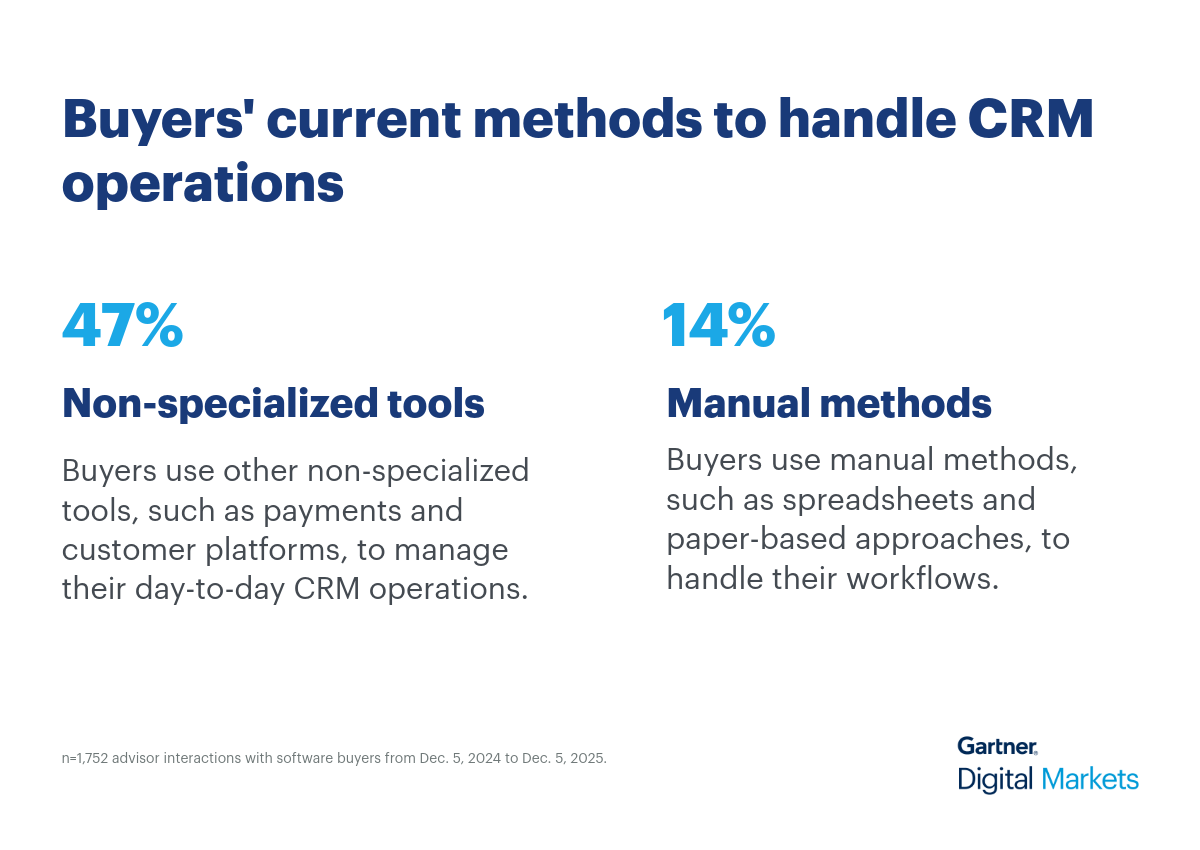
  • Around 47% of buyers use non-specialized tools, such as payments and customer platforms for managing their operation workflows.
  • Nearly 14% of buyers rely on manual methods such as spreadsheets or have a paper-based approach, whereas 23% do not have any system in place.

While manual methods may suffice for very small teams, they create inefficiencies as customer bases grow—leading to missed follow-ups, inconsistent data, and poor visibility into sales pipelines. Non-specialized tools, such as payment or customer platforms, fragment workflows and limit insight. They often lack core CRM capabilities like lead scoring, automated reminders, centralized customer history, and analytics dashboards—features essential for building strong relationships and driving revenue.

This gap presents a clear opportunity for vendors. A dedicated CRM system addresses these challenges by consolidating customer data, automating routine tasks, and providing real-time visibility into interactions and opportunities. Advanced features such as AI-driven lead prioritization, integrated communication channels, and performance analytics enable SMBs to scale efficiently and deliver personalized experiences—capabilities that manual methods and generic tools cannot match.

Pro tip: Start by identifying everyday challenges CRM professionals face—then demonstrate how your software’s tailored capabilities can solve them. Emphasize its industry-specific tools, flexible customization options, and seamless integrations that align with the operational demands of CRM teams.

Why buyers switch to new CRM software

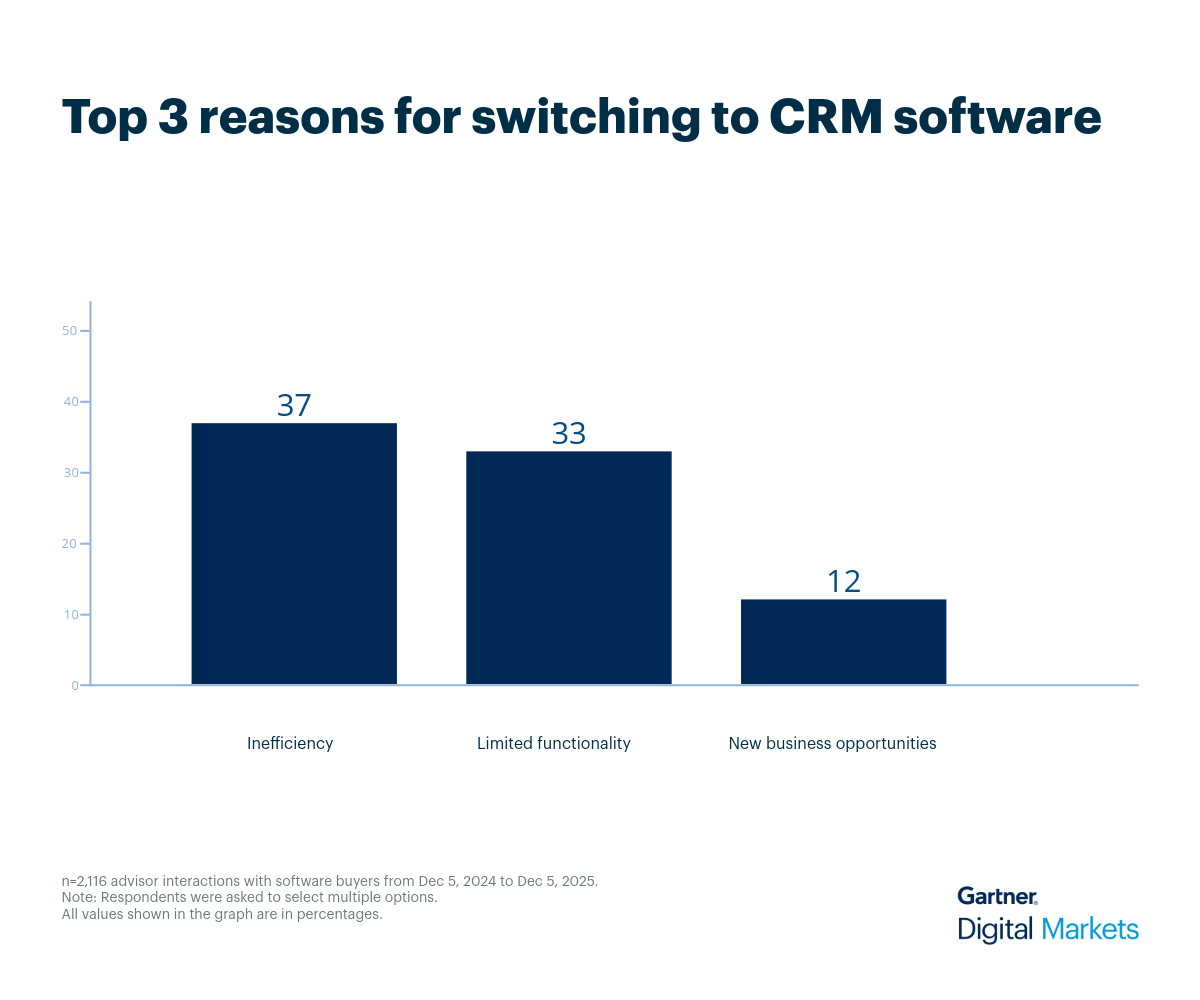
Our advisors conversed with buyers seeking a switch to CRM software from their current manual methods or non-specialized software. These discussions shed light on businesses’ real-life challenges with their existing tools—including inefficiency (37%), limited functionality (33%), and new business opportunities (12%).

  • Inefficiency: Manual CRM processes such as tracking customer interactions in spreadsheets or relying on paper-based notes slow down workflows and increase the risk of errors. Delayed updates, duplicate entries, and siloed data make it difficult to maintain accurate customer records. Similarly, non-specialized tools add complexity by forcing teams to toggle between disconnected platforms for tasks like invoicing, email outreach, and reporting, which wastes time and reduces productivity.
  • Limited functionality: Generic tools and spreadsheets aren’t designed for the dynamic nature of CRM operations. They lack essential capabilities such as automated follow-ups, centralized customer history, pipeline visualization, and integrated communication channels. Without these features, teams struggle to manage growing contact lists, track deal progress, or personalize engagement—especially as customer bases expand and sales cycles become more complex.
  • New business opportunities: Manual methods and non-specialized tools don’t provide the analytics or forecasting needed to identify trends, prioritize leads, or optimize conversion strategies. They lack dashboards for monitoring key metrics like customer lifetime value, churn rates, and campaign performance, making it harder to uncover growth opportunities or refine sales tactics. As a result, businesses miss chances to improve retention, increase revenue, and scale effectively in competitive markets.

From our interactions with buyers, it’s clear that many vendors miss the mark in showing how their software improves CRM managers’ daily workflows. Compared to manual methods and non-specialized tools, dedicated CRM systems offer clear, purpose-built advantages, as listed below:

  • Centralized customer data: Dedicated CRM software consolidates all customer information—contacts, communication history, and purchase records into a single platform. This eliminates data silos and ensures teams have a complete view of every interaction. With centralized data, businesses can reduce duplication, improve accuracy, and make informed decisions quickly.
  • Automated workflows: Routine tasks such as sending follow-up emails, assigning leads, and updating deal stages can be automated within a CRM system. Automation reduces manual effort, minimizes errors, and frees up time for high-value activities like nurturing relationships and closing deals. It also ensures consistency in processes, improving overall efficiency.
  • Real-time analytics: CRM tools provide dashboards and reporting features that deliver real-time insights into sales performance, customer engagement, and pipeline health. These analytics help businesses identify trends, forecast revenue, and adjust strategies proactively. Instead of relying on guesswork, SMBs can make data-driven decisions that improve growth and profitability.
  • Enhanced customer engagement: Integrated communication channels such as email, chat, and social media allow businesses to interact with customers seamlessly from one platform. Combined with personalization features, CRM systems enable timely, relevant outreach that strengthens relationships and boosts retention. This level of engagement is critical for building trust and loyalty in competitive markets.
  • Scalability and integration: As businesses grow, CRM software scales to handle larger customer bases and more complex workflows. Most systems integrate with other tools like enterprise resource planning (ERP), marketing automation, and payment platforms, creating a connected ecosystem. This flexibility ensures that SMBs can expand without disrupting operations or investing in multiple disconnected solutions.

Pro tip: Help your sales team uncover what prospects truly need by gathering detailed requirements and tailoring product demos to match. Reinforce these demos with real-world success stories and client testimonials that highlight how your software improves productivity and reliability—building trust and positioning your solution to close more deals.

What CRM software features are valued the most

When evaluating CRM software, our advisor conversations and review analysis reveal a gap between what buyers seek and what users value most.

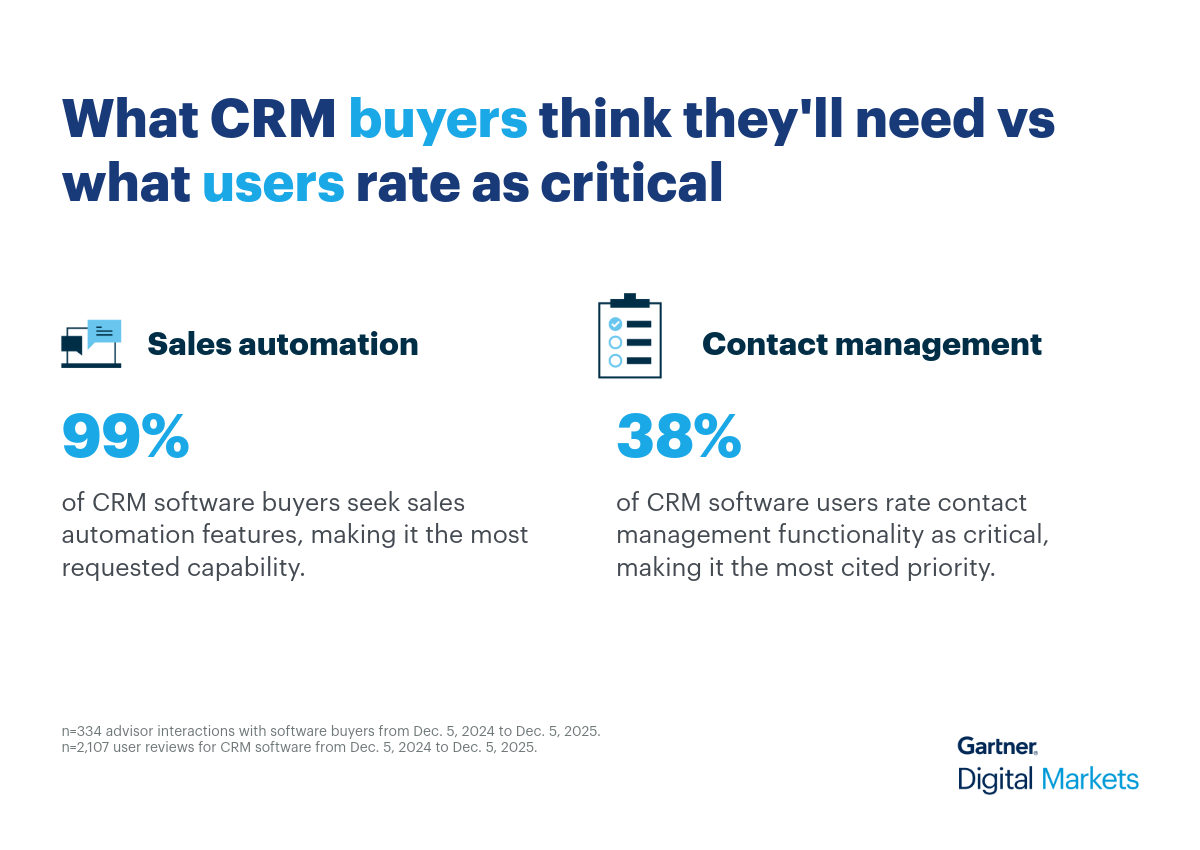
  • Around 99% buyers prioritize sales automation, followed by lead generation, social CRM, and channel management features.
  • On the other hand, the majority of the current users (38%) rate contact management as critical in a CRM tool.
     

This discrepancy highlights a key insight. While buyers prioritize advanced capabilities like sales automation during purchase, current users place higher value on contact management for day-to-day operations. This gap suggests that purchase decisions often focus on efficiency and scalability, whereas actual usage emphasizes maintaining accurate customer records and relationship continuity.

  • Sales automation simplify repetitive sales tasks such as lead assignment, follow-up scheduling, email campaigns, and pipeline updates. These features reduce manual effort, minimize errors, and allow sales teams to focus on high-value activities like nurturing prospects and closing deals. Automation also ensures consistency across processes, improving overall productivity and conversion rates.
  • Contact management involves storing and organizing customer information such as names, addresses, communication history, and preferences in a centralized system. It enables teams to access complete customer profiles, track interactions, and personalize engagement. This functionality is critical for building long-term relationships, improving retention, and ensuring that every touchpoint is informed and relevant.

Pro tip: Update the listing in your Gartner Digital Markets account to highlight buyer priorities such as sales automation and lead generation. Showcase how users apply these features in real life. Adding social proof, such as industry research, awards, and badges strengthens credibility and sets your product apart. 

Use cases for CRM software

A dedicated CRM software supports a wide range of industries such as retail, healthcare, financial services, real estate, manufacturing, and more—each with distinct workflows and specialized feature needs. For example:

  • Real estate businesses use CRM to manage property listings, track client interactions, and automate follow-ups for leads and inquiries. They need features like property-specific tagging, appointment scheduling, document management, and integrated communication tools. Their needs differ because they focus heavily on long sales cycles, high-value transactions, and multi-party coordination (buyers, sellers, agents).
  • Consulting firms leverage CRM to manage client relationships, track project milestones, and maintain visibility into engagement history. Key features include account-based management, proposal tracking, contract storage, and integrated billing workflows. Unlike other industries, consulting prioritizes relationship depth, repeat business tracking, and pipeline visibility for service-based projects rather than product sales.
  • Insurance providers use CRM to manage policyholder data, track claims, and automate renewal reminders. They require features like policy lifecycle tracking, compliance documentation, claims workflow integration, and multi-channel communication. Their needs differ due to regulatory requirements, high-volume customer service interactions, and event-driven engagement (e.g., claims during disasters).
  • Manufacturers use CRM to manage distributor relationships, track B2B sales, and monitor after-sales service. They need features like order history tracking, contract management, integration with ERP systems, and performance analytics for channel partners. Their priorities differ because they focus on bulk orders, long-term contracts, and integration with production and supply chain systems.
  • Healthcare and medicine businesses use CRM to manage patient engagement, appointment scheduling, and outreach for preventive care. They need HIPAA-compliant data handling, secure communication channels, appointment reminders, and analytics for patient satisfaction. Their needs differ because they emphasize privacy compliance, personalized care, and high-frequency interactions rather than traditional sales pipelines.

Average budget for CRM software across industries

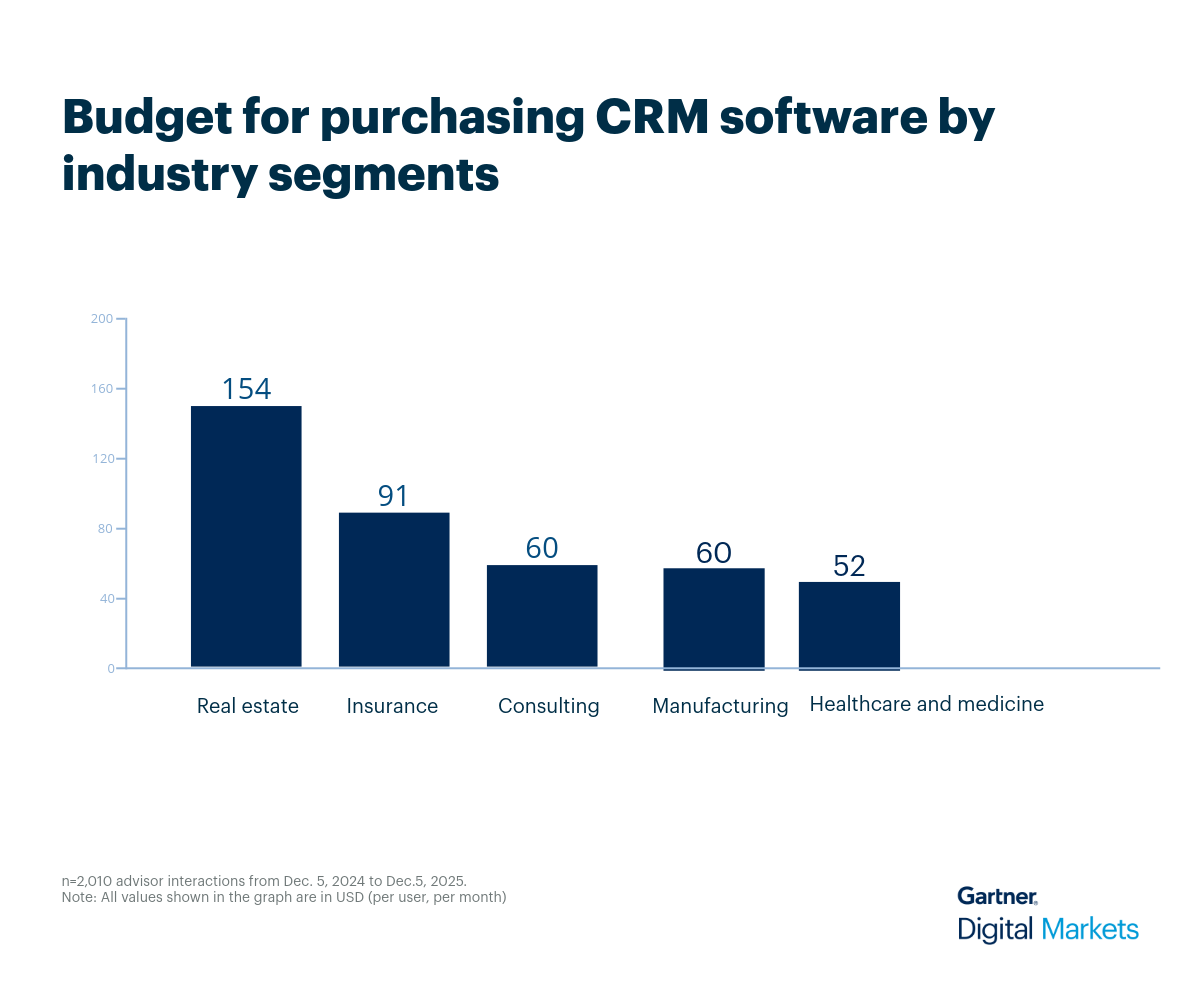
The top five CRM-heavy industries budget between $52–$154 per user monthly, with the overall average being $76.

What impacts this? The budget for purchasing CRM software varies from one industry to another based on factors such as:

  • User count and roles
  • Required modules
  • Add‑ons
  • Integration complexity
  • Data migration scope
  • Training and change management
  • Deployment model
  • Support tier
  • Customization for multi‑site or industry‑specific workflows

Here’s how different CRM industry segments budget (in dollars, per user, per month) for purchasing CRM software.

Pro tip: Make sure your pricing is up-to-date and clear on your product profile. Prospective buyers use this information to build a shortlist in their price range. To see how your offering compares to competitors, use the Capterra 2025 Shortlist for CRM software. 

Buyer goals and challenges—what advisors are hearing

CRM buyers often approach the market with distinct expectations and recurring questions shaped by their sales and customer engagement goals. Through direct conversations with our software advisors, we’ve uncovered insights into buyer behavior and their tasks—revealing patterns in priorities, common challenges, and decision-making criteria. Understanding these patterns helps vendors align their messaging with what buyers truly value during evaluation and implementation.

  • What do CRM buyers most often misunderstand about “marketing” features?
    Many buyers expect advanced, enterprise‑grade email marketing inside a CRM, including complex campaign orchestration and deep automation. Advisors clarify that CRMs typically provide basic email blasts and campaigns, while advanced marketing often requires a separate tool; texting is frequently requested and usually integrated rather than native. Buyers are also surprised by pricing when they move beyond entry‑level tools.
  • How do buyers conflate customer service, help desk, and ticketing—and how does that affect selection?
    A common pattern is mixing up customer‑facing support with internal help desk. Advisors stress that ticketing for employees belongs to help desk, whereas customer service ticketing belongs to CRM‑adjacent customer support. Clarifying this early prevents misqualification and ensures buyers evaluate the right category and integrations with CRM records.
  • When buyers wish to add a call center functionality to their CRM system, what sizing and integration issues emerge?
    Buyers often assume that call center software is only for very large teams, but advisors clarify that solutions exist for small setups as well as large operations with hundreds of agents. Another common misunderstanding is that the people being called (end customers) count as system users—they don’t; only the staff using the system are users. Advisors also explain that call center systems differ from business VoIP phone systems. For integrations, typical requirements include CTI (computer telephony integration), auto dialers, and workforce/performance management tools when the call center is part of the CRM stack. These factors affect the scope of the project, licensing costs, and overall budget.
  • What core tasks drive interest in sales automation—and what should buyers stop expecting from it?
    Buyers want to replace spreadsheet tracking and centralize contacts, activities, and pipeline visibility across sales reps. Advisors emphasize that lead generation is separate—often a service—while sales automation tracks and advances leads through the funnel. Clear separation helps buyers prioritize data hygiene, shared visibility, and process automation over net‑new lead acquisition.
     

Recommended actions for CRM software vendors

Here are five strategic actions vendors can take to better meet buyer expectations and stand out in a competitive market:

  1. Position your CRM as the solution to fragmented workflows: Most buyers are switching from spreadsheets or non-specialized tools that create inefficiencies and data silos. Emphasize how your CRM consolidates customer data, automates repetitive tasks, and provides real-time visibility into interactions and pipelines. Show how this reduces errors, saves time, and improves decision-making—key pain points driving adoption.
  2. Align demos with buyer priorities and actual usage: Buyers often prioritize sales automation during purchase, while current users value contact management for day-to-day operations. Structure demos to highlight automation first, then showcase features that improve relationship continuity, such as centralized contact records and engagement tracking. This dual approach addresses both purchase drivers and retention factors.
  3. Showcase industry-specific capabilities: Different sectors—real estate, consulting, insurance, manufacturing, healthcare—have unique CRM needs. Tailor messaging and demos to these workflows (e.g., HIPAA compliance for healthcare, ERP integration for manufacturing, property tagging for real estate). Vendors that demonstrate deep understanding of vertical challenges position themselves as strategic partners, not generic providers.
  4. Be transparent on pricing and integration readiness: Publish clear pricing aligned with SMB budgets and detail integration options with ERP, marketing automation, and payment platforms. Buyers expect seamless connectivity to avoid adoption friction—position your CRM as integration-ready and scalable for future growth.
  5. Highlight advanced analytics and personalization: Beyond core features, buyers increasingly seek tools that deliver actionable insights and personalized engagement. Showcase predictive analytics, AI-driven lead prioritization, and integrated communication channels as strategic enablers for growth. These capabilities differentiate your CRM and address evolving buyer expectations for efficiency and customer-centricity. 

Rise above your competition with strategic insights

CRM software marketers face enormous pressure to set their products apart from the competition in a crowded marketplace. But with the right insights, you can better understand the key priorities and pain points of your target audience and address them directly in your product messaging to claim your fair share of buyer attention.

With more than 10 million active software buyers on our sites every month, Gartner Digital Markets can equip you with the strategic insights you need to level up your marketing strategy and become a leader in your category.

Log into your Gartner Digital Markets account and optimize your profile to ensure buyers understand how your software meets their evolving needs.

Once your profile is ready, use this insight to build a high-quality sales pipeline and this resource to master follow-ups that convert leads into customers.

Methodology and buyer demographics

Findings are based on data from conversations that Gartner Digital Markets’ advisor team has daily with software buyers seeking guidance on purchase decisions. The data used to create this report is based on interactions with small-to-midsize businesses seeking CRM tools. For this report, we analyzed approximately 2,000+ phone interactions from December 5, 2024, to December 5, 2025.

The findings of this report represent buyers who contacted Gartner Digital Markets and may not be indicative of the market as a whole. Data points are rounded to the nearest whole number.

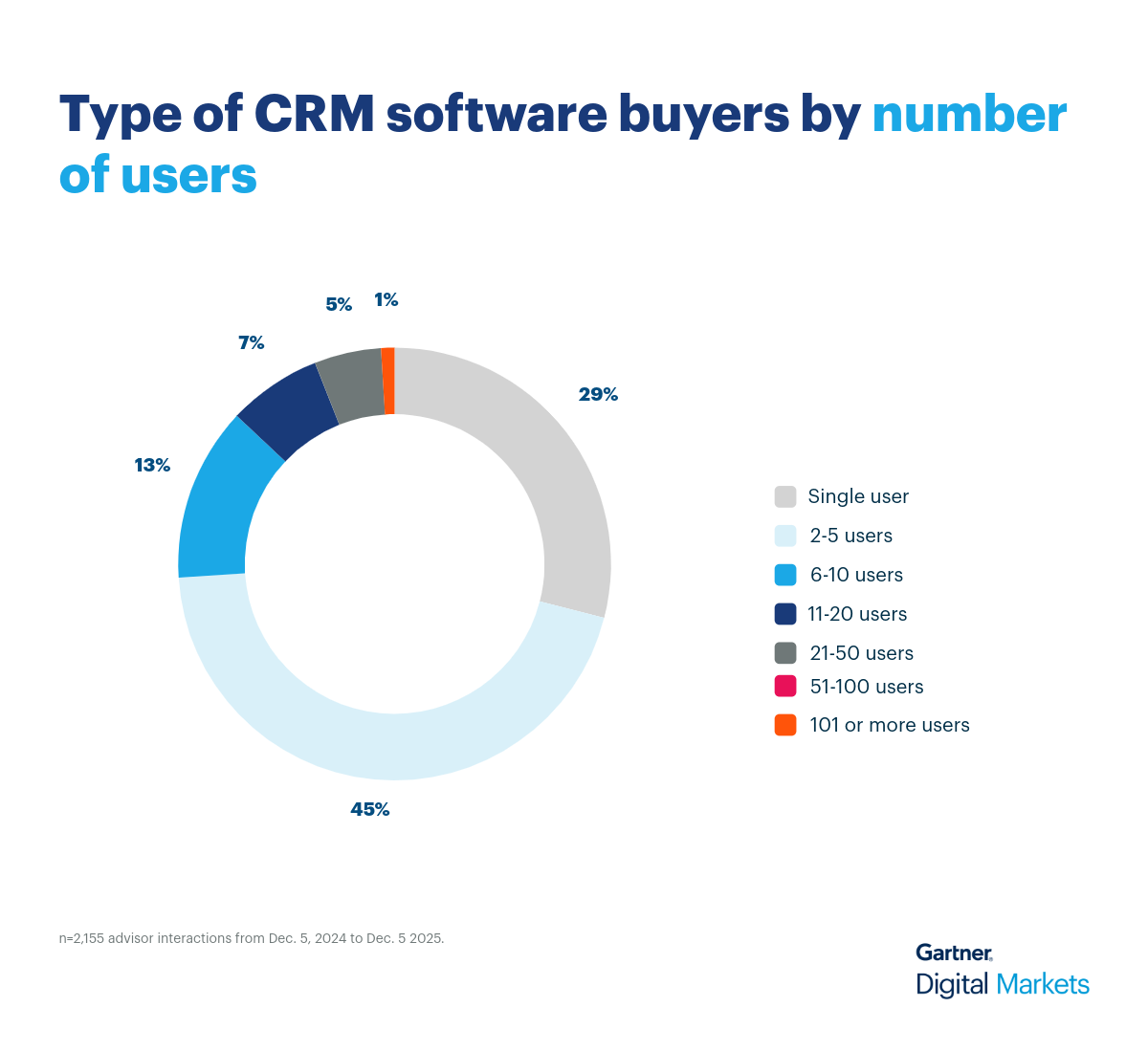
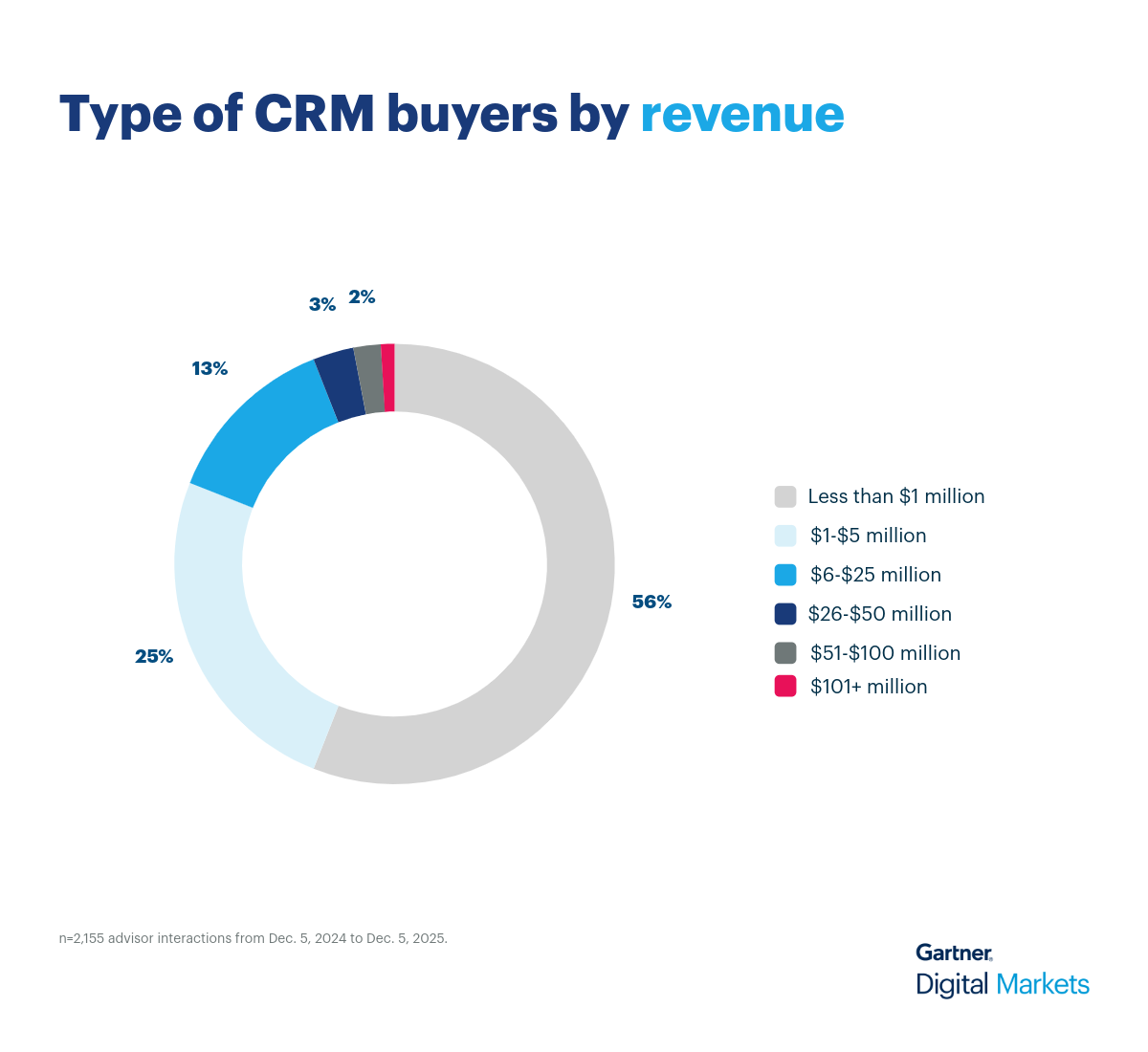
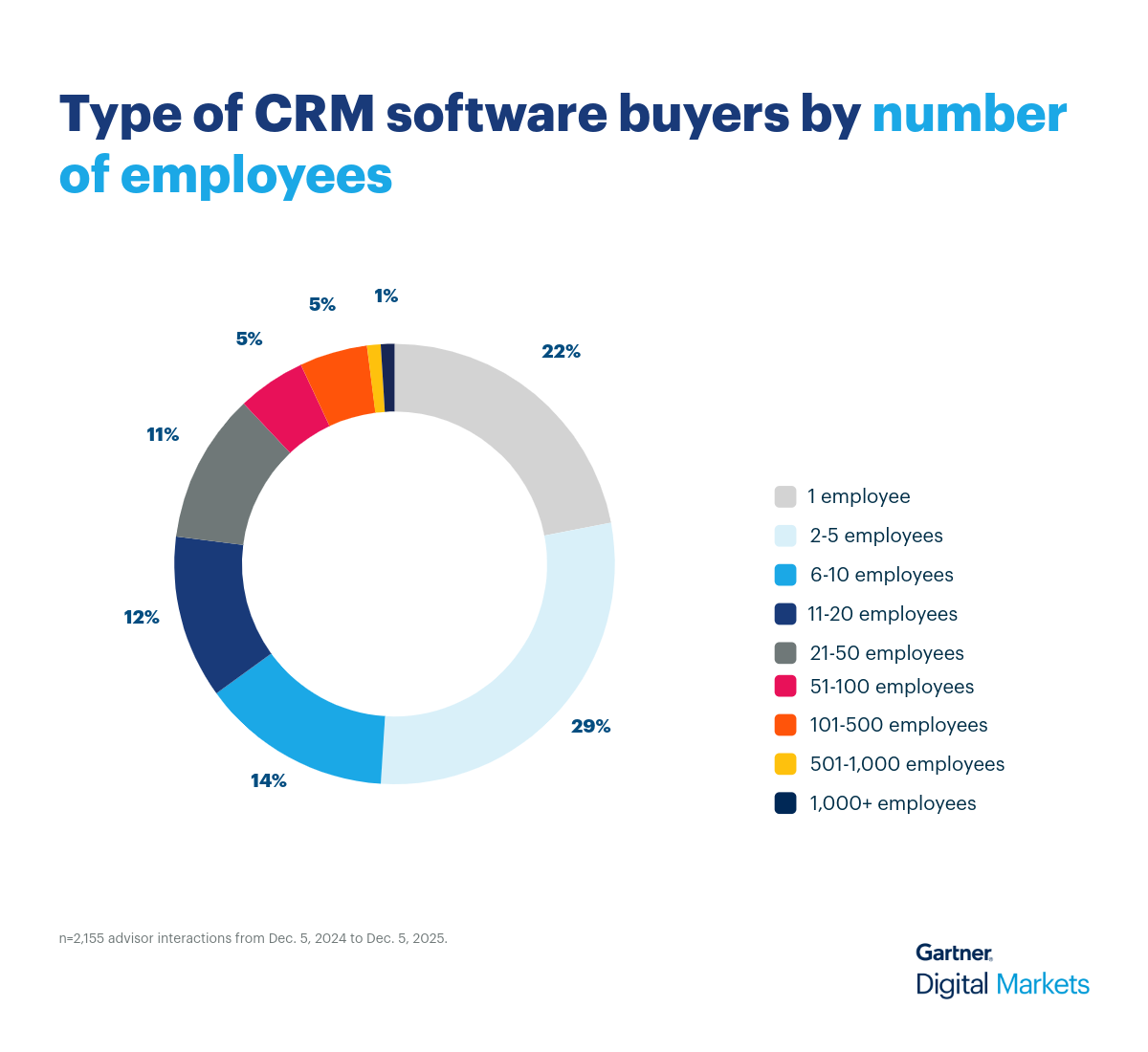
The buyers we interacted with are largely small businesses representing a growing majority of CRM software purchases. Below you’ll find the demographics of the buyers so you can see the size and type of businesses, from annual revenue to industry.


Shephalii Kapoor

Shephalii Kapoor

Shephalii Kapoor is a writer at Gartner Digital Markets. She provides insights to help small businesses identify the right software for their needs by analyzing over 550,000 Gartner Digital Markets user reviews and nearly 48,000 interactions between Gartner Digital Markets software advisors and buyers.

Type of CRM buyers by number of employees
Type of CRM buyers by number of users
Type of CRM buyers by revenue
Get the Gartner Digital Markets Newsletter

We value your privacy. By submitting this form, you agree we may use your information in accordance with the terms of the Gartner Digital Markets Privacy Policy.

Connect. Convert. Thrive.

Connect to millions of in-market software buyers around the globe with our all-encompassing suite of marketing services.